

Not Dispensing Ice - Refrigerator
Possible Solutions
Is the refrigerator making ice?
If the dispenser is dispensing water but not ice, check if the ice maker is making ice.
- If the ice maker is making ice, but not dumping it into the ice bin. Try resetting the Ice Maker. To reset the ice maker, unplug the refrigerator for 1 minute. After resetting, wait a couple of hours and check for ice production; ice is in the bin.
- If the ice maker is not making ice, refer to the "Not Making Ice" section of this troubleshooting guide.
Is the Control Lock or Dispenser Lock on?
The dispenser can be turned off for easy cleaning or to avoid unintentional dispensing by small children and pets. Typically, a "lock" symbol will be displayed to indicate that the feature is turned on. The lock feature does not shut off power to the refrigerator, the ice maker, or the dispenser light. It simply deactivates the dispenser controls and pad. Refer to your Owner's Manual or Quick Start Guide for specific instructions on enabling and disabling the control lock feature.
Is the refrigerator in Sabbath Mode?
Some models are equipped with the Sabbath Mode feature, which is designed for those whose religious observances require turning off the lights and ice maker. When this feature is turned on, the temperature set points and Deli Pan settings remain unchanged. LEDs from the electronic controls will not display. The Sabbath button will be the only light displaying. Ice and Water will not dispense. No alarm will ring. Interior lights will turn off. The product will not change its behavior when the door is opened. Exiting Sabbath Mode varies by model, but typically holding the Sabbath Mode button for 3 seconds activates or deactivates it.
Is the dispenser paddle or pad fully engaged?
If the dispenser paddle or pad is not fully engaged, the dispenser will not dispense ice and/or water. Check that the glass is engaging the paddle or switch by pressing it firmly.
How to Dispense Water or Ice:
- Select water or ice on the display (Depending on the model).
- Press a sturdy glass firmly against the dispenser paddle.
- Remove the glass to stop dispensing.
NOTE: Please refer to your Owner's Manual for specific information on dispensing water and/or ice for your model.
Has the ice clumped together?
Humidity naturally causes ice to clump together. Ice particles can build up until the ice dispenser chute becomes blocked. Clean the ice delivery chute and the bottom of the ice storage bin using a warm, damp cloth, and then dry thoroughly. If ice is not dispensed regularly, it may be necessary to empty the ice storage bin and clean the ice delivery chute, the storage bin, and the area beneath it every 2 weeks. If the ice in the storage bin clumps, break it up with a plastic utensil and discard it. Do not use anything sharp to break up the ice. This can cause damage to the ice bin and the dispenser mechanism.
Is the ice bin installed correctly?
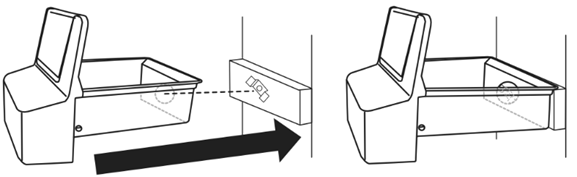
If your refrigerator has an indoor ice-making system (external dispenser), ensure the ice bin is fully snapped into place. If the ice bin is not seated or installed correctly, it can cause low or no ice production. Please see your Owner's Manual for specific instructions on installing the ice bin.
Still need help? Contact us or schedule service.
Please contact us or click below to make an appointment from our preferred list of service providers for service on your appliances.
United States
Canada
Interested in purchasing an Extended Service Plan?
Please click below to learn more on how you can save up to 25% on New Appliance Extended Service Plans within 30 days of your appliance purchase.
United States
Canada